Sunday, 12 May 2013

It's over.... It's finally over!

Well. It's rendering at least!

After many moons, many struggles, many lessons and one mini heart attack. It is done.... And sweet sugar it feels good.

As I watch the render tick down.... I began to remember everything, And i think its fair to do a pretty big blog to recount it :P

Idea
A short animation where a character finds music and reacts to it emotionally.

Software
3Dsmax
Photoshop
Sony Vegas
Adobe Audition

Readings

  • Gahan, Andrew. 3ds Max Modeling for Games: insider's Guide to Game Character, Vehicle, and Environment Modeling. Amsterdam: Focal/Elsevier, 2011. Print.
  • Jackson, Chris. Flash Cinematic Techniques: Enhancing Animated Shorts and Interactive Storytelling. Oxford: Focal, 2010. Print.
  • O'brien, Flora. Walt Disney's Donald Duck: 50 Years of Happy Frustration. Tucson, AZ: HP, 1984. Print.
  • Wells, Paul. Understanding Animation. Abingdon: Routledge, 1998. Print.
  • Marks, Aaron. The complete guide to Game Audio for composers, musicians, sound designers and game developers. Burlington, MA: Focal/Elsevier, 2009. Print.
  • Thomas, Frank, Ollie Johnston and Frank Thomas. The Illusion of Life: Disney Animation. New York: Hyperion, 1995. Print.
  • Wells, Paul. The Fundamentals of Animation. Lausanne: AVA, 2006. Print.
  • Colborn, Gene L. and David B. Lause. Musculoskeletal Anatomy: A text and guide for Dissection: For students in the Allied Health Sciences. Pearl River, NY: Parthenon Pub. Group, 1993. Print.
  • Collett, Peter. The Book of Tells: How to Read People's Minds from Their Actions.London: Bantam, 2004. Print.
  • Whitaker, Harold. Timing for Animation. London: Focal, 2009. Print.
What I learned
  • Rigging - I taught myself to rig efficiently and effectively.
  • Animating by scenes - As I had only previously animated for games I enjoyed making animations to my storyboards designs and I am glad that I took that extra time in pre production to break the scenes up.
  • Animating to music - To get the final effect I had to redo plenty of scenes to make sure they fit.
  • Animating cameras - As i had never worked with cameras in 3Ds Max before it was a new experience and the overall effect has been carried into my other pieces of work.
  • Using cameras to build a scene - Using the cameras to create speed and effects was also a new experience that I feel worked well and created a better final piece.
  • Overall I also planned an entire project and set myself deadlines that I had to adhere to.
What went bad?
Although I am generally positive about how the project went down and was created I feel that there were a few small issues I should have looked into more to make the assignment more comfortable for me.

Although I loved this idea and was adamant to create it, Most of the time while working on it I felt disheartened by it and was constantly convincing myself that it was a bad idea to pick this to show animation skills and that I would be better off creating a complex model and doing some animations on it.

Though this was a comment from the start from a tutor I still say that I am glad that I took the plunge and stuck to my guns. Although this idea was a risky move and wasn't advised from day one the feeling of completion I got from it when it was all done was incredible and I am glad that I did decide to stick with it.

I do wish that I did take that extra bit longer looking into research and constantly stayed on top of work rather than the occasional build up (Not that I ever fell behind!)

The piece

EDIT - So it looks like someone doesn't want it to be embedded....

HERE is a link :)
http://www.youtube.com/watch?v=FydjlCk3kHQ

TA DA!

Enjoy it as much as I enjoyed making it. (No really!)

Hope you all enjoyed reading my blog and my pursuit into animation.

Jack Stalley
The final Post

For more fun follow me on twitter!
@Fuzz7e

Sunday, 5 May 2013

Work Work, Dig Dig, Drink Drink.....

A month later the phoenix rises its ashes...... And begins to blog.

Well the time has come where I begin to compile it all together, Oh did i mention? Animation has all been done! I can go back to sleeping!!! Well sleeping more i guess.

The last steps had a small albeit adjustable issue. In the popular dance PSY crosses his arm and pretending to ride a horse by the reigns, This was a pain as the robots arms do not bend all the way in without serious distortion.

To combat this I chose to create a new dance for the robot to perform using a hybrid of the next stage where PSY imitates a rodeo and the original dance. I also chose to make the leg movements more static with this one to create a "Bunny Hop" styled movement.

To ensure that all the movements were equal I created a plane with 20 panels along so that movements could be tracked effortlessly.

The next step now that all of it is render is to edit and work on the sounds as well as add in the additional art assets.

So same time next week? Maybe a bit earlier this time who knows, I have a headache.

Sunday, 7 April 2013

Mountains of chocolate.... Sorry. Uni work.

The projects going well, In the simplest of ways. After spending some more time working on him falling over I found some new methods of doing specific things with 3Ds Max.

I also spent some time looking into sound effects for the piece. I realized that this wasnt on my schedule so it was a good time to find it in hindsight.

As for editing I also had some practice with a side project, Alot of keybinds in vegas are the same as most other programs I am used to so it was a great find for me and it boosted my confidence in the project.

Im on track to finishing on time, The editing is being done as I render so it will speed things up for me. Once my portfolio site is up and running the video will take pride of place on it.

As for now, Well I have work to do!

Signing off!

Sunday, 24 March 2013

A sad tale....

As I approached the deadline I looked at the way my little robot walked as Nickleback echoed through his mind. He looked sad, It wasn't nice and I realised  how much I enjoyed seeing his changes after being so nervous to start the project.

Now onto the new song, Gangnam style! Will be fun to see how that fares to the dance.

But till then I can't say more, till next time!

Sunday, 10 March 2013

Seeing keyframes......

Hello again! Well its been a week or 2 since i updated and here is why. I recently contracted the Flu which lead to some shall we say technical difficulties.

Whilst I was determined to work I found that in my fevered state I would hallucinate anything that I was doing during the day, Key frames became to real and i would act out each scene I had to animate. The doctors explained to me that it was my brain trying to make up for the work I was meant to do when I was sleeping during the day.

So yeah that happened, It was interesting to say the least but i'm glad I didn't let the bug beat me. I managed to go into uni and get plenty done at the expense of my sleep.

So this week I learnt that the camera could be used as an animation tool. This allowed me to make the UI scenes more visually appealing as if the robot wasn't stood there aimlessly looking into space.

I also learnt a new way of animating the robots face and encountered a rather irritating issue. When the eyebrows are animated a few of the corners attach themselves to a random part of the robot. This had NO explanation but a simple solution was found by moving the vertices when the issue happened and progress wasn't held up by it.

Well time to get back to animating, Till next time!

Sunday, 24 February 2013

Click, Move click. What is this an rpg?

As i mentioned in my previous blog its getting hard to describe whats happened in these without mentioning key elements that will ruin the finished piece.

However, This week as well as digitally animating I have also been working on some other stuff non digitally. For example I attended a life drawing lesson where I managed to scribble some weight notes down when the model moved or stood in a rest position which I have begun to look into with max. Also attending the lessons that Mike has been offering on Friday afternoons has helped incredibly with new techniques that I hope to incorporate into the final piece.

So all in all, progress has been good!

the main focus recently has been on group project as well as sorting out numerous issues with a off project. I've learnt so much already from experimenting with animation and 3D this module and its really helped me with the "Staying" power of work.

Until next time loyal subscribers, Tutors and Stalkers!

Sunday, 17 February 2013

Progress!

Hit target quote for animation this week. *wipes sweat off brow* Feels good!

Work was hard with gamehack and other stuff taking over my personal life but it has helped me to move on and focus on my work.

This was a rather short blog as if i were to upload video's each time i do a piece of work i would ruin the project by the end of it. However, As requested by my specialist tutor.

Here is my model in full :)

It functions well enough for what i need it to display and in personal preference is fairly cute :D


Till then folks!

Saturday, 2 February 2013

Presentation is everything.

Who said a suit isnt "Suitable" (see what i did there?) for uni?

Not me thats for sure, Welcome back to the progress of my progress.

So yesterday I had my progress presentation, For me it was a big deal as it let me show what I'd done in my absence and was a nice look at the evolution of the project.

It went great by the way, I've never been so confident in my life.

A point that got brought up was that I hadn't updated my progress tracker since Christmas so this is it!

01/02/2013

  • Create presentation for check.
  • Update blog with progress.
  • Create new task list.
15/02/2013
  • Animate scenes 1 - 9
  • Render scenes 1 - 9
01/03/2013
  • Animate scenes 10 - 25
  • Render scenes 10 - 25
15/03/2013
  • Animate scenes 25 - 35
  • Render scenes 25 - 35
29/03/2013
  • Animate scenes 36 - 45
  • Render scenes 36 - 45
12/04/2013
  • Animate scenes 45 - 64
  • Render scenes 45 - 64
Remainder
  • Compile the rendered footage into one piece.
  • Edit the sound and music into the final piece.
  • Polish the video and render it to high quality and a web safe version for presentation.
Hopefully it should be a bit clearer now and as always shall be blogging my progress at least weekly.

Till then folks, Have a good one and Happy Birthday to Brent Spiner!
(aka data from star trek)

Thursday, 24 January 2013

*blows dust off blog*

Well I'm back :D

Had some major PC issues just before christmas and didnt get it fixed till the new year. Its all good now just been working on group project and getting some feedback from a company about my design masterclass project.

So what have I been doing? Well for one my Robots name is Billy now (Smallest sister requested it) and i've been working through my scene storyboards.
This was something that I underestimated until I started animating and I appreciate the amount of work that goes into any animated piece that I see now.

I have also spent some time learning to move cameras and set them on paths as well as arranging them to certain times.

So what progress have I made? Well that would be revealing wouldn't it! I hope you can make the most out of storyboards 1-6 as thats all thats been animated.

Its a big step for me animating facial movement with eyes etc. but its a strong one.

Whats that?

Friday, 21 December 2012

Update regarding late posts

Holidays are coming!!!!

*regains composure*

Well it seems like its been a long time since I posted anything. It has, I've had some personal issues regarding stuff and its still not 100% yet. BUT the good news is after getting over the majority its now nothing that will affect my workflow (though some blogs may be early/late)

Now back on track.
As my previous blog detailed, I have done a mini timeline of what needs to be completed by when, Its not completed yet as I need to sort out the scenes and how they're going to be animated.

The original idea was to create a virtual environment for the robot to be animated in. Although I wanted to create a detailed scene for each section I was advised to stick with simple visual aides. I ended up making one large scene with simple scenery as well as positioning various cameras for each scene.

The scene where the robot leaves the room.
The trees and bushes are cloned all the way down to give a sense
of speed for the walking scenes.


21st Dec.
So for this week I set myself the UI screens as a tasklist. After experimenting with some chroma keying in Vegas I realized that i was creating more work than necessary for myself as instead I could just make a text layer in Sony Vegas that I could animate and add effects overtop to get a better feel for what I wanted.

Well this counts for the 2 weeks progress, Christmas updates will be as regular as I can make them!

So stay safe folks and have a Merry Christmas!

Timeline, What im hoping to achieve ideally! Now updated!

So as most of my readers would have noted, Alot of tasks have been completed.... But how many are left is kind of a mystery.

So to counteract that I'm going to put up some deadlines and tasks that need to be completed by then.

30/11/2012
  • Asset list created
  • Script created
  • Storyboard created
  • Storyboard Animated
  • Robot modeled and textured
7/12/2012
  • Rig Robot
  • Test robot with simple animations
  • Factory placeholder and Path area
14/12/2012

  • Make the CD
  • Make Log
  • Placeholder scene for the robot to run through
  • Placeholder scene for robot to dance through
  • Suitable placeholder scene for robot to dance off
21/12/2012
  • UI – SCAN COMPLETE
  • UI – ITEM IS A STORAGE DISC
    CONTENTS – MUSIC
  • UI – ALLOW TRACK TO PLAY?
      Y/N
  • UI – WARNING
    UNAUTHORIZED LIMB CONTROL
  • UI – FIND SIGNS OF LIFE
  • UI – SCAN ITEM
    ANAZLYZE CONTENTS
  • UI – HOW YOU REMIND ME
  • UI – crisis state animation of fluid levels etc.
  • UI – EMERGENCY SHUT DOWN IMINENT
  • UI – Animation of a startup sequence.
  • UI – Animation of track 2 being deleted.
28/12/2012

  • Test scale of robot in scenes.
  • Go over previous tasks and check progress.
  • Organize storyboard into scenes.

Wednesday, 5 December 2012

Rigging complete!

Well that was a successful weekend, Managed to rig the model and up and until now was tearing my hair out trying to sort the vertices and weights. Now.... We have bones!

So I finally learnt how to rig, Its an amazing feeling seeing as the last 2 years ive been crying about trying to do it and failing.

It turns out that while I have been placing the bones correctly and skinning perfectly.... the vertices need to be rigid and 1.0 added to them all, Its still rough but the great thing about animating in 3D is I can change the vertices if I need to mid animation.

Polish Polish Polish as they say, Small update for you all. Now to work on the levels!

Thursday, 29 November 2012

Assets, MORE ASSETS!

So here is a small list of what I still need to make though not in full priority.

This is generally just to keep me above theoretical water on my project.


Asset List
Physical

  • Factory placeholder built
  • UI – FIND SIGNS OF LIFE
  • Blocks shaped like bushes
  • Rough pathway
  • CD
  • UI – SCAN ITEM
    ANAZLYZE CONTENTS
  • Cartoon FLASH
  • UI – SCAN COMPLETE
  • UI – ITEM IS A STORAGE DISC
    CONTENTS – MUSIC
  • UI – ALLOW TRACK TO PLAY?
      Y/N
  • UI – WARNING
    UNAUTHORIZED LIMB CONTROL
  • Placeholder scene for the robot to run through
  • Log for the robot to trip over
  • UI – HOW YOU REMIND ME
  • UI – crisis state animation of fluid levels etc.
  • UI – EMERGENCY SHUT DOWN IMINENT
  • UI – Animation of a startup sequence.
  • UI – Animation of track 2 being deleted.
  • Placeholder scene for robot to dance through.
  • Suitable placeholder scene for robot to dance off.

Sound
  • Heavy sliding for doors
  • Heavy metal foot steps
  • Mechanical panning noises for eyes
  • Heavy crunch foot steps.
  • Zoom noise
  • Flash noise
  • beeping noise for text
  • Beeping noise for notifications
  • Large metal crash
  • Pound sound effect
  • Warning beep
  • Reboot beep
  • Reboot jingle

Friday, 23 November 2012

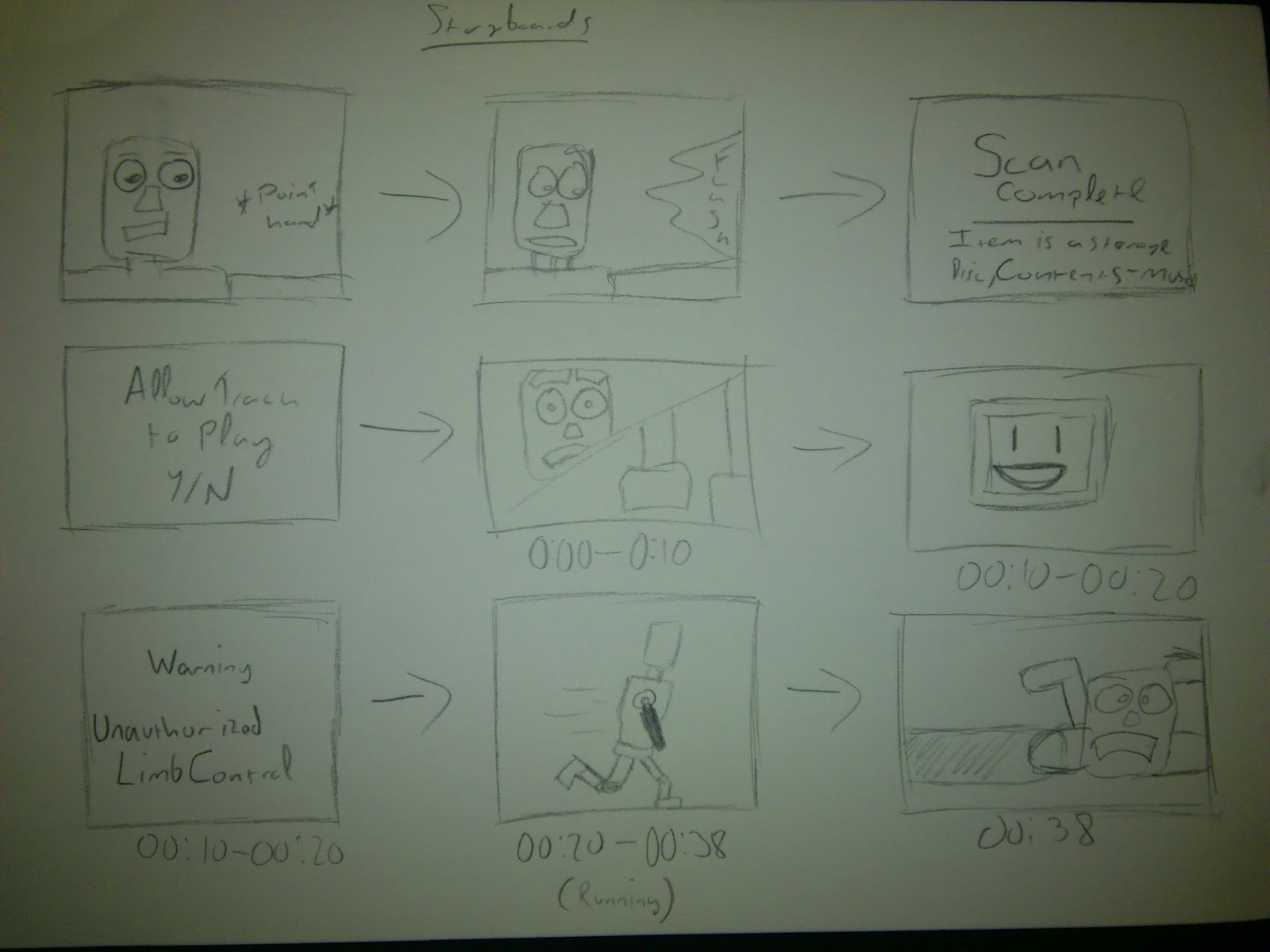
Storyboard complete! This time with music!

So for the majority of yesterday and today I did alot of storyboard work.... For those of you that dont know me, I hate doing storyboards. So this wasnt a walk in the park for me.

After creating the scenes I put them together to the music and made a rough timeline, I hope you enjoy and be nice!

and heres the scenes if the video isnt your bag ;)


Thursday, 22 November 2012

Aumo. The musical robot.


Finally it takes shape, Well sort of.

After getting my proposal feedback I carried on with my sprint work, First step (after making the script) create Aumo!!

As part of the feedback was to ignore modelling the environment for now and focus on the animation I decided to create the robot and begin my steps on rigging.


Now because Aumo is a main focus I tried out a few ideas on how he was going to be modeled starting with the Head.

An idea with the eyes mounted on antenna like devices. I ended up not
using this design as I wanted to add more features to the face.
An idea with the eyes in a jar floating in a un-known fluid which would act as
eyebrows. As much as i loved this idea the eyes would prove to be very difficult to animate
as they were surrounded by another object.


I began with the face, I based it off an earlier sketch with
the other designs shown above.
Using the box tool i extruded a rough leg shape and
added a stretched cylinder into the middle for a spine.

I then built a rough torso designed to look powerful
and intimidating.
Once this was done i created a small neck joint and
applied the chamfer modifier to the original models.
I used the box tool to create a rough claw shape and auto
smoothed it to make it look neater.
A front view of the completed model before the screen
was added in for emotion display.

Completed after the screen was added.


 Next step, Storyboarding!


BELOW HERE LIE SPOILERS!

This is a brief blog of my script plan, Although I didn't want to upload this I figured people can decide whether or not they want to read it now.

If you like it, Comment.

IF YOU CONTINUE READING YOU WILL SEE SPOILERS.

LAST WARNING


The scene fades into a run down abandoned factory. The years have taken its toll on the building and there are obvious signs of decay on the door and walls.

As the camera stops the doors open to reveal a dark room.

Large metallic steps are heard from inside before the camera swaps to a POV shot from the Robot. A digital UI reads,
FIND SIGNS OF LIFE
The camera swaps to a close up of the robots face as its eyes look around the scene before walking off scene.

Cut to long shot as the robot walks along a path in between overgrown foliage before the camera pans round to the front of the robot as it stops in its tracks and looks down at an unknown item.

POV as the camera zooms in on the CD

POV shot as a UI reads,
SCAN ITEM
ANALYZE CONTENTS

Shot of the robots face as it raises its hand off screen as a large flash appears off screen before the robot looks back down.

POV shot as a UI reads,
SCAN COMPLETE
New Text appears
ITEM IS A STORAGE DISC,
CONTENTS – MUSIC
Another icon lights up on UI.
ALLOW TRACK 1 TO PLAY?
Y/N

The camera swaps to a closeup of the robot beginning to twitch and nod as “MIGHTY MORPHING POWER RANGERS THEME” begins to play.

00:00 – 00:10 the robots face looks puzzled and its feet befin to twitch in anticipation.

00:10 – 00:20 its logo changes to a smile “:D” and a UI shot shows a warning message.
WARNING
UNAUTHORIZED LIMB CONTROL

00:20 – 00:38 The robot sprints down the overgrown path with a huge smile on its face, the camera initially allows it to pass before catching up with a closeup showing how excited the robot has become

00 :38 – the robot trips over a log causing the music to stop.

The robots eyes roll around as it regains its balance. It thinks back to the CD and chooses the next track on its UI.
The UI shows a song called “HOW YOU REMIND ME” The robot begins to think to itself as the music begins.

00:00 – 00:16 The song slowly fades in and the robots logo changes to “O_O” as the robots face changes from excited to confused.

00:16 – 00:26 The logo changes to “:’(“ and the robots face changes to almost upset as its fluid fills to the top and its eyes lower in the tank and the head twitches as if its sniffing.

00:26 – 00:40 The robots UI pops up showing a readout for fluid levels and malfunctions in the limbs again as the robot begins to walk slowly, heavily and skulks into the brush.


00:26 – 00:40 The robots UI pops up showing a readout for fluid levels and malfunctions in the limbs again as the robot begins to walk slowly, heavily and skulks into the brush.

00:40 -1:00 Closeup of the robots face as it falls to its knees and begins to pound the floor

1:00 – 1:10 UI shows “EMERGENCY SHUT DOWN IMINENT.”

The robots eyes roll back into its head and falls flat on its face.

A startup animation plays over the UI showing a reboot system.

As the robots eyes roll forward and it stands up slowly.

POV shot of the UI as it shows track 2 being deleted. Track 3 begins to play.

00:00 – 00:15 Robot looks around and smiles as its eyes widen, the logo on it changes to a pixel PSY logo.

00:15 – 00:27 The robot begins to walk in a confident stride nodding its head to the music (Disney)

00:27 – 00:29 The robot slides off screen (camera behind)

00:29 – 00:44 Very close shot of head and shoulders from front as the robot continues to walk getting closer before going off screen.

00:44 – 1:05 Shot from behind of the robot dancing in place happily as the music gets faster (leading to the chorus kick in 1:05) and the camera gets closer to the face.

1:05 – 1:08 Close up of face as the robot turns to the “OOPA GANGNAM STYLE”

1:08 – 1:11 camera behind as the robot begins to dance the Gangnam dance.

1:11 – 1:15 the robot rides off down the path doing the signature dance.

1:15 Fade to black as the robot rides off.

Credits

Thursday, 15 November 2012

A script without dialogue? Seems legit!

So this week I started my steps to making my dissertation, Step 1? Pre production.

I know I know. After watching me research like there was no tomorrow to get the proposal finished and submitted..... You would of at least expect to see the robot greyboxed roaming around an environment. Just kidding we all knew that would take a while but heres what I did this week.

After looking at the range of emotions I decided to stick with excitement, Depression and Happiness as the 3 types of music tracks I wanted to animate to. Although I had originally planned to create my own music I chose to use pieces that already existed as it gave me more flexibility with how I plan my production. It also meant that I would have better quality music than what I would be capable of creating.

For excitement I chose the theme from the popular "Mighty Morphing Power Rangers" as the build up to the main theme gave the right feeling for the robot experiencing a build up of excitement before charging off.


For depression I chose "How you remind me" by Nickleback. This was more of a personal reason as I have always found the song to be quite depressing and the bass sounds like the rhythm of a slow heavy walk.


Finally, to end my piece and show happiness I chose to use the very popular "Gangnam Style" by the South Korean band PSY. I chose to use Gangnam style because the video contains alot of smiling and is a generally uplifting styled song. I also chose to choreograph the robot to do the dance shown in the video as it is a very active dance and thought that maybe it would be a fun view to see the robot riding off into the sunset on the "invisible horse" part of the dance.


Storyboards coming up next!

Monday, 5 November 2012

Robot concept sketches, GO FOR THE FACE

So after all of the character development research I conducted this week I finally sat down sketched some facial expressions on different character sheets.

To begin with I looked at my initial idea and what the flaws
were with the design. After that I began to sketch
different designs and listed their pros and cons.

After some ideas i decided to stick with the complex design
as it had more facial features to show emotion.

After finishing the last of the face reactions I looked at
minimal ideas like Wall E and created a rough idea
of a simple concept.

The concept was designed like the human face but with
a more robotic feel than the previous ones.


Sunday, 4 November 2012

3DS Max Modelling for Games - The final book of research....

To round off a week of research, Sketching (Gotta be patient!) and watching far to many Disney films I checked out my final book to help me with the model. For those of you that haven't guessed, This book is one of those generic help ones that tell the reader how to use 3Ds Max and what the suggested plan of action is to get the best result.

This volume is dedicated to Game character, Vehicles and Environment Modelling with guides on low and high polygon modelling. The book also covers advanced techniques like alpha transparency and smoothing groups. This would be useful for the overgrowth in the apocalyptic setting the robot has woken up in as it also has guides for modelling landscapes and buildings in a fallout fashion.

Although the majority of books that I have used as research have been note and take back, I feel that this book will be checked out of the library for the modelling stage and will be referenced alot for guides on texturing with the environment.

Another part of the book that I found interesting was the low poly modelling guide for characters as it was something that I experimented with in my second year as my major model but didn't get the desired effect that I had planned. After looking through the book and reading the tutorials that they include I can see where my model's high polycount came from and where I could have saved time in the long run.

The texturing sections really helped me to understand how to better sort the UV's out on my model when it came down to it and simple steps that would make the texture more professional and visually appealing.

Bibliography

  • Gahan, Andrew. 3ds Max Modeling for Games: insider's Guide to Game Character, Vehicle, and Environment Modeling. Amsterdam: Focal/Elsevier, 2011. Print.

Cinematic techniques, Cross platform? I sure hope so!

After talking to a librarian about what books are often taken out by film students (as well as asking in town about animation books) I was pointed towards "Flash Cinematic Techniques" which on first glance looked to be useless for me as it was the wrong platform but nevertheless the subtext "Enhancing animated shorts and interactive storytelling" was enough to pull me in.

The book starts off by covering types of animation and how they would be used to replace  iconic scenes. As I mentioned in a previous blog, Animated characters have to over compensate on their display of emotions as they are not director friendly like human actors are which the book goes into detail on.

The book also covers a general FAQ about the flash workspace (which although interesting was not necessary to my project) as well as teaching the reader about different techniques they can use to get the best result in art.

The main section that I knew I would be using as reference was the in depth descriptions of the camera angles and the general shooting space. This chapter demonstrates how camera angles can be used to create a better scene, for example if a camera is placed above a character the viewer will perceive them as a small or insignificant character. If the camera is lower down however and they see the character from a low point they will perceive him as tall, powerful and a stronger character.

The book also helped me understand storyboards more clearly and how detailed they needed to be for the emotions to be captured properly. With this in mind when it comes to the laying out of the storyline (after it gets approved) I  know where to start and hopefully finish as well as allowing me to better plan my time along which scenes could take the most time or would need additional editing and planning.

Bibliography

  • Jackson, Chris. Flash Cinematic Techniques: Enhancing Animated Shorts and Interactive Storytelling. Oxford: Focal, 2010. Print.