Thursday, 24 January 2013

*blows dust off blog*

Well I'm back :D

Had some major PC issues just before christmas and didnt get it fixed till the new year. Its all good now just been working on group project and getting some feedback from a company about my design masterclass project.

So what have I been doing? Well for one my Robots name is Billy now (Smallest sister requested it) and i've been working through my scene storyboards.
This was something that I underestimated until I started animating and I appreciate the amount of work that goes into any animated piece that I see now.

I have also spent some time learning to move cameras and set them on paths as well as arranging them to certain times.

So what progress have I made? Well that would be revealing wouldn't it! I hope you can make the most out of storyboards 1-6 as thats all thats been animated.

Its a big step for me animating facial movement with eyes etc. but its a strong one.

Whats that?

Friday, 21 December 2012

Update regarding late posts

Holidays are coming!!!!

*regains composure*

Well it seems like its been a long time since I posted anything. It has, I've had some personal issues regarding stuff and its still not 100% yet. BUT the good news is after getting over the majority its now nothing that will affect my workflow (though some blogs may be early/late)

Now back on track.
As my previous blog detailed, I have done a mini timeline of what needs to be completed by when, Its not completed yet as I need to sort out the scenes and how they're going to be animated.

The original idea was to create a virtual environment for the robot to be animated in. Although I wanted to create a detailed scene for each section I was advised to stick with simple visual aides. I ended up making one large scene with simple scenery as well as positioning various cameras for each scene.

The scene where the robot leaves the room.
The trees and bushes are cloned all the way down to give a sense
of speed for the walking scenes.


21st Dec.
So for this week I set myself the UI screens as a tasklist. After experimenting with some chroma keying in Vegas I realized that i was creating more work than necessary for myself as instead I could just make a text layer in Sony Vegas that I could animate and add effects overtop to get a better feel for what I wanted.

Well this counts for the 2 weeks progress, Christmas updates will be as regular as I can make them!

So stay safe folks and have a Merry Christmas!

Timeline, What im hoping to achieve ideally! Now updated!

So as most of my readers would have noted, Alot of tasks have been completed.... But how many are left is kind of a mystery.

So to counteract that I'm going to put up some deadlines and tasks that need to be completed by then.

30/11/2012
  • Asset list created
  • Script created
  • Storyboard created
  • Storyboard Animated
  • Robot modeled and textured
7/12/2012
  • Rig Robot
  • Test robot with simple animations
  • Factory placeholder and Path area
14/12/2012

  • Make the CD
  • Make Log
  • Placeholder scene for the robot to run through
  • Placeholder scene for robot to dance through
  • Suitable placeholder scene for robot to dance off
21/12/2012
  • UI – SCAN COMPLETE
  • UI – ITEM IS A STORAGE DISC
    CONTENTS – MUSIC
  • UI – ALLOW TRACK TO PLAY?
      Y/N
  • UI – WARNING
    UNAUTHORIZED LIMB CONTROL
  • UI – FIND SIGNS OF LIFE
  • UI – SCAN ITEM
    ANAZLYZE CONTENTS
  • UI – HOW YOU REMIND ME
  • UI – crisis state animation of fluid levels etc.
  • UI – EMERGENCY SHUT DOWN IMINENT
  • UI – Animation of a startup sequence.
  • UI – Animation of track 2 being deleted.
28/12/2012

  • Test scale of robot in scenes.
  • Go over previous tasks and check progress.
  • Organize storyboard into scenes.

Wednesday, 5 December 2012

Rigging complete!

Well that was a successful weekend, Managed to rig the model and up and until now was tearing my hair out trying to sort the vertices and weights. Now.... We have bones!

So I finally learnt how to rig, Its an amazing feeling seeing as the last 2 years ive been crying about trying to do it and failing.

It turns out that while I have been placing the bones correctly and skinning perfectly.... the vertices need to be rigid and 1.0 added to them all, Its still rough but the great thing about animating in 3D is I can change the vertices if I need to mid animation.

Polish Polish Polish as they say, Small update for you all. Now to work on the levels!

Thursday, 29 November 2012

Assets, MORE ASSETS!

So here is a small list of what I still need to make though not in full priority.

This is generally just to keep me above theoretical water on my project.


Asset List
Physical

  • Factory placeholder built
  • UI – FIND SIGNS OF LIFE
  • Blocks shaped like bushes
  • Rough pathway
  • CD
  • UI – SCAN ITEM
    ANAZLYZE CONTENTS
  • Cartoon FLASH
  • UI – SCAN COMPLETE
  • UI – ITEM IS A STORAGE DISC
    CONTENTS – MUSIC
  • UI – ALLOW TRACK TO PLAY?
      Y/N
  • UI – WARNING
    UNAUTHORIZED LIMB CONTROL
  • Placeholder scene for the robot to run through
  • Log for the robot to trip over
  • UI – HOW YOU REMIND ME
  • UI – crisis state animation of fluid levels etc.
  • UI – EMERGENCY SHUT DOWN IMINENT
  • UI – Animation of a startup sequence.
  • UI – Animation of track 2 being deleted.
  • Placeholder scene for robot to dance through.
  • Suitable placeholder scene for robot to dance off.

Sound
  • Heavy sliding for doors
  • Heavy metal foot steps
  • Mechanical panning noises for eyes
  • Heavy crunch foot steps.
  • Zoom noise
  • Flash noise
  • beeping noise for text
  • Beeping noise for notifications
  • Large metal crash
  • Pound sound effect
  • Warning beep
  • Reboot beep
  • Reboot jingle

Friday, 23 November 2012

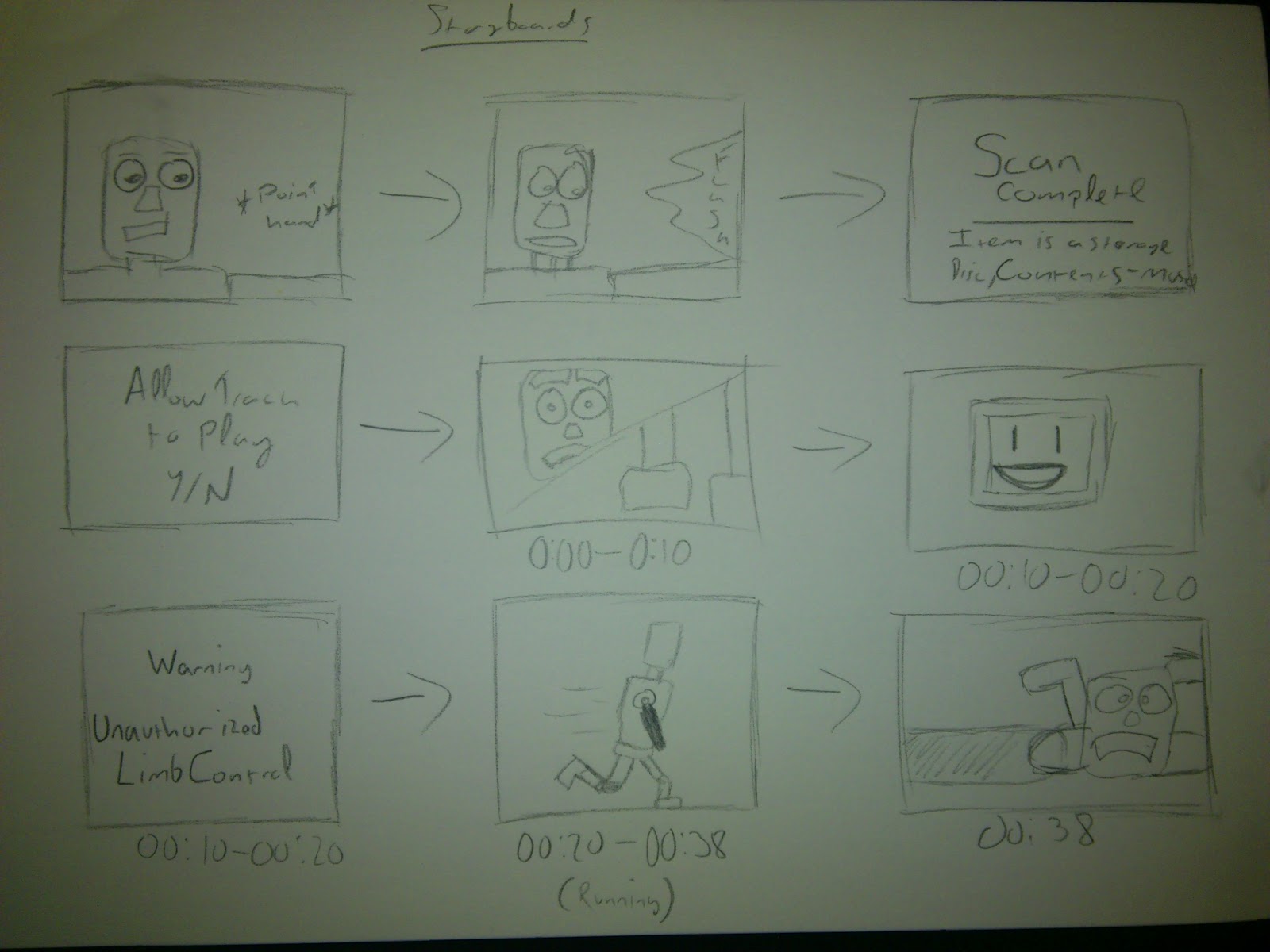
Storyboard complete! This time with music!

So for the majority of yesterday and today I did alot of storyboard work.... For those of you that dont know me, I hate doing storyboards. So this wasnt a walk in the park for me.

After creating the scenes I put them together to the music and made a rough timeline, I hope you enjoy and be nice!

and heres the scenes if the video isnt your bag ;)


Thursday, 22 November 2012

Aumo. The musical robot.


Finally it takes shape, Well sort of.

After getting my proposal feedback I carried on with my sprint work, First step (after making the script) create Aumo!!

As part of the feedback was to ignore modelling the environment for now and focus on the animation I decided to create the robot and begin my steps on rigging.


Now because Aumo is a main focus I tried out a few ideas on how he was going to be modeled starting with the Head.

An idea with the eyes mounted on antenna like devices. I ended up not
using this design as I wanted to add more features to the face.
An idea with the eyes in a jar floating in a un-known fluid which would act as
eyebrows. As much as i loved this idea the eyes would prove to be very difficult to animate
as they were surrounded by another object.


I began with the face, I based it off an earlier sketch with
the other designs shown above.
Using the box tool i extruded a rough leg shape and
added a stretched cylinder into the middle for a spine.

I then built a rough torso designed to look powerful
and intimidating.
Once this was done i created a small neck joint and
applied the chamfer modifier to the original models.
I used the box tool to create a rough claw shape and auto
smoothed it to make it look neater.
A front view of the completed model before the screen
was added in for emotion display.

Completed after the screen was added.


 Next step, Storyboarding!