Friday, 21 December 2012

Update regarding late posts

Holidays are coming!!!!

*regains composure*

Well it seems like its been a long time since I posted anything. It has, I've had some personal issues regarding stuff and its still not 100% yet. BUT the good news is after getting over the majority its now nothing that will affect my workflow (though some blogs may be early/late)

Now back on track.
As my previous blog detailed, I have done a mini timeline of what needs to be completed by when, Its not completed yet as I need to sort out the scenes and how they're going to be animated.

The original idea was to create a virtual environment for the robot to be animated in. Although I wanted to create a detailed scene for each section I was advised to stick with simple visual aides. I ended up making one large scene with simple scenery as well as positioning various cameras for each scene.

The scene where the robot leaves the room.
The trees and bushes are cloned all the way down to give a sense
of speed for the walking scenes.


21st Dec.
So for this week I set myself the UI screens as a tasklist. After experimenting with some chroma keying in Vegas I realized that i was creating more work than necessary for myself as instead I could just make a text layer in Sony Vegas that I could animate and add effects overtop to get a better feel for what I wanted.

Well this counts for the 2 weeks progress, Christmas updates will be as regular as I can make them!

So stay safe folks and have a Merry Christmas!

Timeline, What im hoping to achieve ideally! Now updated!

So as most of my readers would have noted, Alot of tasks have been completed.... But how many are left is kind of a mystery.

So to counteract that I'm going to put up some deadlines and tasks that need to be completed by then.

30/11/2012
  • Asset list created
  • Script created
  • Storyboard created
  • Storyboard Animated
  • Robot modeled and textured
7/12/2012
  • Rig Robot
  • Test robot with simple animations
  • Factory placeholder and Path area
14/12/2012

  • Make the CD
  • Make Log
  • Placeholder scene for the robot to run through
  • Placeholder scene for robot to dance through
  • Suitable placeholder scene for robot to dance off
21/12/2012
  • UI – SCAN COMPLETE
  • UI – ITEM IS A STORAGE DISC
    CONTENTS – MUSIC
  • UI – ALLOW TRACK TO PLAY?
      Y/N
  • UI – WARNING
    UNAUTHORIZED LIMB CONTROL
  • UI – FIND SIGNS OF LIFE
  • UI – SCAN ITEM
    ANAZLYZE CONTENTS
  • UI – HOW YOU REMIND ME
  • UI – crisis state animation of fluid levels etc.
  • UI – EMERGENCY SHUT DOWN IMINENT
  • UI – Animation of a startup sequence.
  • UI – Animation of track 2 being deleted.
28/12/2012

  • Test scale of robot in scenes.
  • Go over previous tasks and check progress.
  • Organize storyboard into scenes.

Wednesday, 5 December 2012

Rigging complete!

Well that was a successful weekend, Managed to rig the model and up and until now was tearing my hair out trying to sort the vertices and weights. Now.... We have bones!

So I finally learnt how to rig, Its an amazing feeling seeing as the last 2 years ive been crying about trying to do it and failing.

It turns out that while I have been placing the bones correctly and skinning perfectly.... the vertices need to be rigid and 1.0 added to them all, Its still rough but the great thing about animating in 3D is I can change the vertices if I need to mid animation.

Polish Polish Polish as they say, Small update for you all. Now to work on the levels!

Thursday, 29 November 2012

Assets, MORE ASSETS!

So here is a small list of what I still need to make though not in full priority.

This is generally just to keep me above theoretical water on my project.


Asset List
Physical

  • Factory placeholder built
  • UI – FIND SIGNS OF LIFE
  • Blocks shaped like bushes
  • Rough pathway
  • CD
  • UI – SCAN ITEM
    ANAZLYZE CONTENTS
  • Cartoon FLASH
  • UI – SCAN COMPLETE
  • UI – ITEM IS A STORAGE DISC
    CONTENTS – MUSIC
  • UI – ALLOW TRACK TO PLAY?
      Y/N
  • UI – WARNING
    UNAUTHORIZED LIMB CONTROL
  • Placeholder scene for the robot to run through
  • Log for the robot to trip over
  • UI – HOW YOU REMIND ME
  • UI – crisis state animation of fluid levels etc.
  • UI – EMERGENCY SHUT DOWN IMINENT
  • UI – Animation of a startup sequence.
  • UI – Animation of track 2 being deleted.
  • Placeholder scene for robot to dance through.
  • Suitable placeholder scene for robot to dance off.

Sound
  • Heavy sliding for doors
  • Heavy metal foot steps
  • Mechanical panning noises for eyes
  • Heavy crunch foot steps.
  • Zoom noise
  • Flash noise
  • beeping noise for text
  • Beeping noise for notifications
  • Large metal crash
  • Pound sound effect
  • Warning beep
  • Reboot beep
  • Reboot jingle

Friday, 23 November 2012

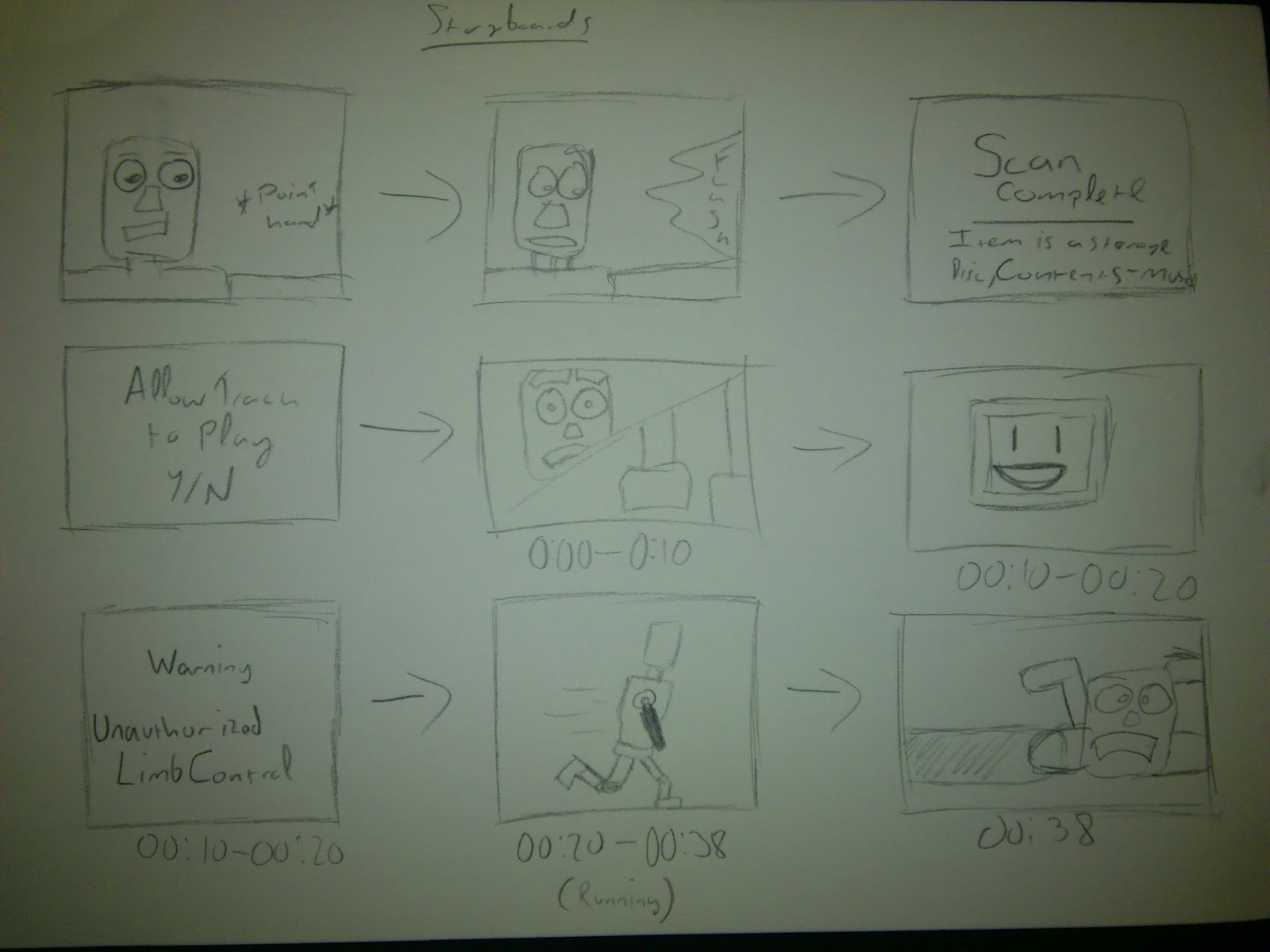
Storyboard complete! This time with music!

So for the majority of yesterday and today I did alot of storyboard work.... For those of you that dont know me, I hate doing storyboards. So this wasnt a walk in the park for me.

After creating the scenes I put them together to the music and made a rough timeline, I hope you enjoy and be nice!

and heres the scenes if the video isnt your bag ;)


Thursday, 22 November 2012

Aumo. The musical robot.


Finally it takes shape, Well sort of.

After getting my proposal feedback I carried on with my sprint work, First step (after making the script) create Aumo!!

As part of the feedback was to ignore modelling the environment for now and focus on the animation I decided to create the robot and begin my steps on rigging.


Now because Aumo is a main focus I tried out a few ideas on how he was going to be modeled starting with the Head.

An idea with the eyes mounted on antenna like devices. I ended up not
using this design as I wanted to add more features to the face.
An idea with the eyes in a jar floating in a un-known fluid which would act as
eyebrows. As much as i loved this idea the eyes would prove to be very difficult to animate
as they were surrounded by another object.


I began with the face, I based it off an earlier sketch with
the other designs shown above.
Using the box tool i extruded a rough leg shape and
added a stretched cylinder into the middle for a spine.

I then built a rough torso designed to look powerful
and intimidating.
Once this was done i created a small neck joint and
applied the chamfer modifier to the original models.
I used the box tool to create a rough claw shape and auto
smoothed it to make it look neater.
A front view of the completed model before the screen
was added in for emotion display.

Completed after the screen was added.


 Next step, Storyboarding!


BELOW HERE LIE SPOILERS!

This is a brief blog of my script plan, Although I didn't want to upload this I figured people can decide whether or not they want to read it now.

If you like it, Comment.

IF YOU CONTINUE READING YOU WILL SEE SPOILERS.

LAST WARNING


The scene fades into a run down abandoned factory. The years have taken its toll on the building and there are obvious signs of decay on the door and walls.

As the camera stops the doors open to reveal a dark room.

Large metallic steps are heard from inside before the camera swaps to a POV shot from the Robot. A digital UI reads,
FIND SIGNS OF LIFE
The camera swaps to a close up of the robots face as its eyes look around the scene before walking off scene.

Cut to long shot as the robot walks along a path in between overgrown foliage before the camera pans round to the front of the robot as it stops in its tracks and looks down at an unknown item.

POV as the camera zooms in on the CD

POV shot as a UI reads,
SCAN ITEM
ANALYZE CONTENTS

Shot of the robots face as it raises its hand off screen as a large flash appears off screen before the robot looks back down.

POV shot as a UI reads,
SCAN COMPLETE
New Text appears
ITEM IS A STORAGE DISC,
CONTENTS – MUSIC
Another icon lights up on UI.
ALLOW TRACK 1 TO PLAY?
Y/N

The camera swaps to a closeup of the robot beginning to twitch and nod as “MIGHTY MORPHING POWER RANGERS THEME” begins to play.

00:00 – 00:10 the robots face looks puzzled and its feet befin to twitch in anticipation.

00:10 – 00:20 its logo changes to a smile “:D” and a UI shot shows a warning message.
WARNING
UNAUTHORIZED LIMB CONTROL

00:20 – 00:38 The robot sprints down the overgrown path with a huge smile on its face, the camera initially allows it to pass before catching up with a closeup showing how excited the robot has become

00 :38 – the robot trips over a log causing the music to stop.

The robots eyes roll around as it regains its balance. It thinks back to the CD and chooses the next track on its UI.
The UI shows a song called “HOW YOU REMIND ME” The robot begins to think to itself as the music begins.

00:00 – 00:16 The song slowly fades in and the robots logo changes to “O_O” as the robots face changes from excited to confused.

00:16 – 00:26 The logo changes to “:’(“ and the robots face changes to almost upset as its fluid fills to the top and its eyes lower in the tank and the head twitches as if its sniffing.

00:26 – 00:40 The robots UI pops up showing a readout for fluid levels and malfunctions in the limbs again as the robot begins to walk slowly, heavily and skulks into the brush.


00:26 – 00:40 The robots UI pops up showing a readout for fluid levels and malfunctions in the limbs again as the robot begins to walk slowly, heavily and skulks into the brush.

00:40 -1:00 Closeup of the robots face as it falls to its knees and begins to pound the floor

1:00 – 1:10 UI shows “EMERGENCY SHUT DOWN IMINENT.”

The robots eyes roll back into its head and falls flat on its face.

A startup animation plays over the UI showing a reboot system.

As the robots eyes roll forward and it stands up slowly.

POV shot of the UI as it shows track 2 being deleted. Track 3 begins to play.

00:00 – 00:15 Robot looks around and smiles as its eyes widen, the logo on it changes to a pixel PSY logo.

00:15 – 00:27 The robot begins to walk in a confident stride nodding its head to the music (Disney)

00:27 – 00:29 The robot slides off screen (camera behind)

00:29 – 00:44 Very close shot of head and shoulders from front as the robot continues to walk getting closer before going off screen.

00:44 – 1:05 Shot from behind of the robot dancing in place happily as the music gets faster (leading to the chorus kick in 1:05) and the camera gets closer to the face.

1:05 – 1:08 Close up of face as the robot turns to the “OOPA GANGNAM STYLE”

1:08 – 1:11 camera behind as the robot begins to dance the Gangnam dance.

1:11 – 1:15 the robot rides off down the path doing the signature dance.

1:15 Fade to black as the robot rides off.

Credits